
Begin with the world, not the sign-in screen
A successful Minecraft sign-in answers an account question. It does not, by itself, prove that a world stored on another device has arrived. Before replacing a tablet, identify the particular Bedrock world you want to preserve. Record its name, the device where it opens correctly, and one recent construction that makes the current copy recognizable. A screenshot of a newly finished bridge is more useful for this purpose than a familiar world thumbnail that may have remained unchanged for months.
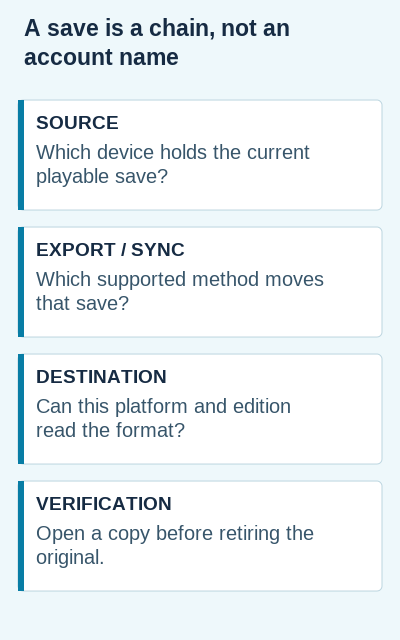
The official Minecraft help article describes Realms as a way to move a Bedrock world between devices. That route concerns a world copy and requires the applicable Realm access; it is not a promise that every purchase, local setting or edition moves together. Establish whether the destination actually runs Bedrock before considering the transfer. Java worlds and Bedrock worlds are not interchangeable merely because both launchers display Minecraft. Treat edition conversion as a separate project with separate evidence, not as an invisible part of this procedure.
Give each copy a job
Use three labels in your notes: original, transfer copy and destination copy. The original is the currently useful world on the old device. The transfer copy is the version uploaded through the supported route. The destination copy is the world you intend to open on the new device. These labels prevent a common reasoning error: calling the newest-looking file a backup while continuing to change it. A backup should provide a way back to the condition you meant to preserve.
In a hypothetical household, a child builds a railway on a tablet while another family member prepares the replacement phone. The family should agree on a pause in construction before the transfer. Otherwise the uploaded world may contain the station but omit track built later. Write down the transfer cutoff and avoid playing competing copies until verification is complete. This is a coordination rule, not a claim that Minecraft automatically detects or resolves every divergent version of a world.
Prepare a small acceptance test
Choose three checks that represent what matters in this world: a location, a possession or inventory condition, and a world feature such as the intended game mode. Do not make the test simply “the world loads.” A world can open successfully while still being an earlier copy. If the recent railway is the important change, travel to the station and check its latest extension. If coordinates are part of your usual navigation, record them privately before moving the world rather than relying on memory afterward.
Also record any add-ons, resource packs or other dependencies that are essential to understanding the world. The transfer should not be judged solely by whether a decorative pack looks different, but missing dependencies can affect the experience you intended to preserve. Confirm compatibility through the current Minecraft documentation and the relevant publisher information. Do not assume that a paid item becomes available to every family account because it is used in a world another account can access.
Follow the supported route deliberately
Open the linked official instructions at the time of transfer, because management screens and platform capabilities can change. Confirm which account owns or manages the Realm and which device holds the original before choosing upload, replace or download actions. Similar labels can describe opposite directions. Read the destination named by a confirmation screen, especially when replacing an existing world. If that destination contains another important project, protect it independently before proceeding.
Keep a short action log with the source device, selected world and completion message. It does not need passwords, recovery codes or payment information. The purpose is to make an interrupted task understandable: if the phone battery runs low, you should be able to tell whether you had finished uploading or had only reached the selection screen. A visible Realm entry alone is weaker evidence than opening the transferred world and confirming the acceptance checks you chose beforehand.
Inspect the destination before playing normally
After obtaining the world on the new device through the supported method, open the intended copy and perform the landmark checks. Look for the station extension, the correct location and the other conditions in your notes. If something disagrees, stop normal play on the destination. Creating substantial new work in a questionable copy makes the eventual reconciliation harder. Compare the source and destination calmly rather than overwriting one again simply because its timestamp appears more recent.
Test the controls and presentation separately from the transfer result. A different screen size may make familiar movement awkward without implying that the world data is damaged. Conversely, a smooth frame rate does not demonstrate that the correct save was transferred. Keep these conclusions distinct in your notes: world identity verified, important content verified, and destination controls acceptable. This separation makes it easier to decide whether the next problem belongs to world management or to device setup.
Close the project with a recovery route
Retain the original device and protected copy until the new arrangement has been checked through a normal save-and-return cycle. Decide which copy becomes authoritative from that point onward. Label the old one as an archive so that a family member does not accidentally continue building there. If a Realm subscription was used for the transfer, review its continuing purpose and current billing terms independently; completing a transfer does not decide whether you want ongoing hosted play.
The final record should let you answer a concrete question: if the destination were unavailable tomorrow, which preserved world would you use and what work would be missing? If you cannot answer, the move is not yet a reliable backup plan. This guide describes a source-based workflow, not a report that OOZGM moved your world or tested every device combination. The official Minecraft instructions remain the authority for the supported transfer actions; your own landmark checks establish whether your particular project reached its intended destination.
Bedrock world transfer acceptance sheet
Record world identity and observable landmarks without passwords or account secrets.
| Copy role | Device | World name | Recent landmark | Verified date | Result |
|---|---|---|---|---|---|
| Original | |||||
| Transfer copy | |||||
| Destination |
Hypothetical railway project
The family verifies the newly built station extension on the replacement tablet before archiving the original world.
Download worksheet (CSV)A blank or example-based planning file for your device. OOZGM does not receive what you enter.
Follow the sources
AI-assisted editorial analysis of public evidence. Suggested workflows and hypothetical cases are not reported device-test results. Report a correction.